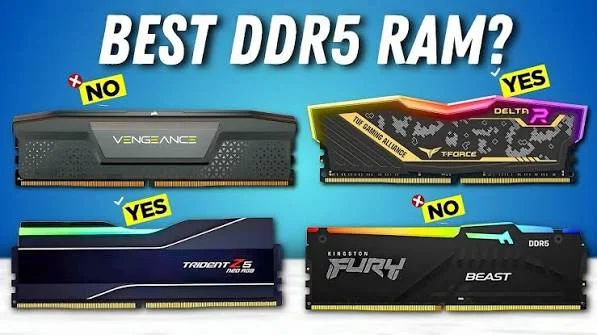

Modern DDR5 memory delivers over fifty percent more bandwidth than older fourth generation desktop memory. Video games, video editing software, and multi tasking applications demand rapid communication between the central processor and system memory. If your memory transfers data slowly, your graphics card and processor will spend valuable seconds waiting for files. Upgrading to high speed memory kits removes performance bottlenecks and keeps frame rates steady during heavy gameplay.
Hardware brands have released dozens of memory kits with different speeds, heat spreaders, and latency ratings. Picking the right kit can feel confusing when numbers like megatransfers and timing codes fill product listings. G.Skill, Corsair, Kingston, and TeamGroup remain the top four memory manufacturers dominating the market today. This comprehensive guide breaks down the best memory options for every budget, processor type, and computer build.
What Makes DDR5 Memory So Much Faster?
DDR5 memory represents a major technological jump over older memory standards used in desktop computers. Older memory sticks shared a single thirty two bit data channel across the entire module. Modern DDR5 sticks feature two independent thirty two bit sub channels on every single stick. This dual channel layout allows the memory controller to read and write smaller data blocks simultaneously with minimal waiting time.
Power management has also moved directly onto the physical memory stick itself. In older systems, the motherboard managed voltage regulation for system memory, which caused electrical noise and heat. DDR5 sticks include an onboard power management integrated circuit that controls electricity with precision. This clean power delivery improves operational stability when pushing memory sticks to extreme frequencies.
On die error correction code is another built in feature that protects your system from random crashes. The memory chip fixes single bit errors automatically inside the silicon before bad data reaches the processor. This automatic protection keeps your operating system stable during long gaming sessions and large file exports. You get higher speeds along with greater reliability for daily computing tasks.
Speed and Latency: How to Read Memory Numbers
Memory performance depends on two primary numbers listed on the retail package. The first number is frequency, measured in megatransfers per second or megahertz. Higher numbers like six thousand or seven thousand mean the memory can transfer more data every second. Fast transfer rates are ideal for high resolution video editing, file compression, and high refresh rate gaming.
The second critical metric is CAS latency, usually written as CL followed by a two digit number like CL30 or CL36. CAS latency measures the delay in clock cycles between when a command is sent and when data is ready. Lower latency numbers mean the memory responds to requests faster. A kit rated at six thousand megatransfers with CL30 latency offers an ideal balance of speed and responsiveness.
First word latency combines both frequency and CAS latency to calculate the true real world response time in nanoseconds. A memory kit with high frequency but loose latency numbers might respond slower than a kit with lower frequency and tight timings. Gamers should prioritize low latency kits to minimize frame drops in fast paced competitive shooters. Knowing these numbers helps you avoid overpaying for memory you do not need.
G.Skill Trident Z5: The King of Low Latency Performance
G.Skill has built a strong reputation among PC builders for delivering record breaking memory performance. The Trident Z5 series stands out as one of the most popular choices for gamers seeking maximum speed. These sticks use premium aluminum heat spreaders with a sleek brushed metal strip running across the center. You can choose matte black, metallic silver, or bright white finishes to match your PC case color scheme.
The Trident Z5 Neo line is built specifically for AMD Ryzen processors using AMD EXPO technology. These kits feature one click profile tuning that sets memory to six thousand megatransfers per second with tight CL30 timings. AMD processors perform at their absolute best when paired with this specific speed configuration. The low latency profile ensures smooth frame pacing across demanding open world games.
For Intel users, the standard Trident Z5 RGB line offers extreme speeds exceeding eight thousand megatransfers per second. G.Skill bins its silicon memory chips strictly to ensure that high speed kits maintain stable overclocks. The light bar on top provides smooth, vibrant lighting that syncs with all major motherboard lighting software. G.Skill delivers exceptional performance for enthusiasts who demand the fastest hardware available.
Corsair Dominator Titanium and Vengeance: Premium Design and Smart Control
Corsair remains a household name in computer hardware, known for premium build quality and software support. The Dominator Titanium series represents the absolute top tier of luxury memory design. These modules feature solid forged aluminum heat spreaders and patented cooling technology that pulls heat away from chips rapidly. The top lighting bar can be removed or swapped with custom decorative fins for personalized styling.
Dominator Titanium memory sticks connect directly with the Corsair iCUE software suite. You can monitor individual stick temperatures in real time, set custom fan curves, and create complex lighting patterns. The software also allows users to create custom XMP memory profiles to fine tune voltages and timings. This deep hardware control appeals to builders who love monitoring system statistics.
For builders on a moderate budget, the Corsair Vengeance DDR5 line provides excellent value in a compact package. Vengeance modules feature low profile heat spreaders that fit easily beneath massive dual tower air coolers. You get dependable performance and solid stability without paying extra for heavy metal heatsinks or fancy lighting. Corsair offers dependable memory kits suitable for both budget builds and showcase gaming rigs.
Kingston Fury Renegade and Beast: Rock Solid Reliability
Kingston has manufactured computer memory for decades, focusing on broad compatibility and long term dependability. The Kingston Fury Beast DDR5 line serves as the workhorse of mainstream gaming builds. These modules feature low profile heat spreaders with aggressive geometric styling that looks clean in any chassis. Kingston tests its memory on hundreds of motherboard models to guarantee plug and play functionality.
Fury Beast memory modules include automatic overclocking features for users who prefer not to enter the motherboard BIOS. When plugged into a compatible motherboard, the sticks detect the fastest safe profile automatically. This simple setup makes Kingston memory ideal for first time PC builders who want speed without technical configuration. The low height clearance also prevents installation conflicts with large CPU coolers.
The Kingston Fury Renegade series targets high end gaming enthusiasts with taller, thicker aluminum heat spreaders. Renegade kits offer speeds up to eight thousand megatransfers per second with tight factory timings. The infrared sync technology keeps RGB lighting patterns synchronized across modules without extra cables or background software. Kingston delivers remarkable reliability backed by a lifetime hardware warranty.
TeamGroup T-Force Delta RGB and T-Create: Maximum Value for Money
TeamGroup has become a favorite brand among budget conscious PC builders by delivering high speeds at affordable prices. The T-Force Delta RGB DDR5 series features a bold stealth fighter inspired design with a wide angle light bar. The full length diffuser emits bright, even light that fills the interior of your PC case. TeamGroup uses quality SK Hynix memory chips that deliver great overclocking potential at lower price points.
T-Force Delta memory is available in both black and clean snow white editions. White PC builds have become very popular, and TeamGroup offers some of the best looking white memory modules on the market. The aggressive pricing allows builders to invest more money into their graphics card or processor. You get high end visual flair and fast transfer speeds without breaking the bank.
For digital creators and video editors, the TeamGroup T-Create Expert series offers rock solid stability with zero lighting. These modules feature understated black or silver aluminum heat spreaders designed to run cool inside workstation cases. T-Create kits come in high capacity configurations like sixty four gigabytes or ninety six gigabytes. Creators get massive memory pools to edit eight thousand resolution video files without crashing.
Best DDR5 Memory Kits Compared
| Memory Kit Model | Target User | Top Speed & Latency | Key Advantage | Overall Value |
|---|---|---|---|---|
| G.Skill Trident Z5 Neo | AMD Gamers | 6000 MT/s CL30 | Perfect Ryzen sweet spot | High Performance |
| Corsair Dominator Titanium | Luxury Builders | Up to 8000 MT/s CL38 | Swappable tops & iCUE | Premium Flagship |
| Kingston Fury Beast | Budget Builders | 5600 to 6000 MT/s | Plug and play compatibility | Best Reliability |
| TeamGroup T-Force Delta | RGB Enthusiasts | 6400 to 7200 MT/s | Low price per gigabyte | Best Budget Value |
| Corsair Vengeance | Minimalist Builds | 6000 MT/s CL36 | Low profile cooler fit | Great Everyday Choice |
AMD Ryzen vs Intel Core: Choosing the Right Profile
AMD and Intel processors handle high speed memory in fundamentally different ways. AMD Ryzen processors on the AM5 platform run best when the memory clock matches the internal processor memory controller clock. This balanced ratio hits its peak performance at six thousand megatransfers per second. Running faster memory on Ryzen often forces the processor into a slower gear ratio, reducing real world gaming performance.
Look for memory kits with AMD EXPO certification if you build a Ryzen based system. EXPO profiles contain timing parameters optimized specifically for AMD sub timings and memory controllers. Enabling EXPO in your motherboard settings takes a single click and guarantees stable gaming performance. A six thousand megatransfer CL30 EXPO kit is the undisputed gold standard for Ryzen systems.
Intel Core processors handle much higher memory frequencies with ease thanks to flexible memory controller designs. Intel platforms benefit from memory running at seven thousand two hundred megatransfers or higher in memory heavy applications. Look for Intel XMP 3.0 certified memory when assembling an Intel based gaming rig. Intel processors take full advantage of extreme frequency kits to deliver high minimum frame rates.
Air Cooler Clearance and Heatsink Height
Tall memory heat spreaders with bright light bars look amazing inside panoramic glass cases. However, large RGB memory modules can cause severe physical interference with dual tower CPU air coolers. Massive air coolers like the Thermalright Peerless Assassin or Noctua NH D15 extend directly over motherboard memory slots. If your memory sticks are too tall, the front cooling fan will not fit properly over the heatsink.
Measure the height clearance of your CPU cooler before purchasing tall memory kits. Standard low profile memory sticks like Corsair Vengeance or Kingston Fury Beast measure around thirty five millimeters tall. These compact sticks fit easily beneath almost every large air cooler on the market without pushing the front fan upward. Low profile memory ensures clean airflow and easy installation.
If you plan to use an all in one liquid cooler, memory height is rarely an issue. Liquid cooling blocks attach directly to the processor, leaving the surrounding memory slots completely open. You can install the tallest G.Skill Trident Z5 or Corsair Dominator modules without worrying about physical contact. Always plan your memory choices around your chosen cooling solution to avoid installation surprises.
How to Enable XMP and EXPO in Your Motherboard BIOS
Buying fast memory does not mean your computer will run at those speeds right out of the box. Motherboard safety standards default all new DDR5 memory to base JEDEC speeds of forty eight hundred megatransfers. If you do not enable the performance profile, your expensive memory will run at basic speeds. Turning on full performance requires a quick thirty second trip into your motherboard BIOS.
Restart your computer and tap the delete key or F2 key repeatedly while the screen is black. This keyboard action opens your motherboard BIOS menu on your display screen. Look for the primary overclocking section, often labeled as EZ Mode, Ai Tweaker, or Extreme Tweaker. You will see a prominent button labeled XMP for Intel boards or EXPO for AMD boards.
Select Profile 1 from the dropdown menu to apply the factory rated speed, latency, and voltage settings automatically. Press the F10 key on your keyboard to save your changes and restart your computer into Windows. Open the Windows Task Manager, click on the Performance tab, and verify that your memory shows the full rated speed. Your computer is now running with full memory bandwidth enabled.
Common Memory Mistakes Builders Must Avoid
Installing memory sticks into the wrong motherboard slots is one of the most common mistakes beginners make. Most desktop motherboards contain four memory slots, but running two sticks requires using specific paired slots. Always install your two memory sticks into slots two and four, counting outward from the CPU socket. Using the correct slots ensures proper electrical signal strength for high speed stability.
Mixing two different memory kits together is another dangerous mistake that causes frequent blue screen crashes. Even if two kits share the same brand name and speed rating, they may use completely different memory chips inside. Combining mismatched silicon forces the memory controller to handle conflicting sub timings. Always buy a single matched kit containing two sticks rather than buying two separate packages.
Forgetting to update your motherboard BIOS can also cause stability issues with fast memory. Motherboard manufacturers release regular BIOS updates that improve memory training and signal stability for new memory kits. If your memory struggles to boot with XMP or EXPO enabled, flash your motherboard to the newest BIOS version. A quick update often resolves memory compatibility problems instantly.
32GB vs 64GB: How Much RAM Do You Actually Need?
Thirty two gigabytes configured as two sixteen gigabyte sticks is the sweet spot for modern gaming computers. A thirty two gigabyte pool provides plenty of capacity to run demanding games alongside Discord, web browsers, and music apps. Modern games rarely consume more than twenty gigabytes of memory, leaving plenty of headroom for background tasks. Investing beyond thirty two gigabytes yields zero extra frame rates in gaming.
Sixty four gigabytes or ninety six gigabytes becomes necessary for content creators, 3D animators, and software developers. Video editing applications like Adobe Premiere Pro and DaVinci Resolve consume massive amounts of memory when previewing 4K footage. Running virtual machines and compiling large software projects also benefits from large memory pools. Choose higher capacity kits only if your professional workflow demands it.
Buying two sticks is always superior to installing four sticks on consumer DDR5 motherboards. Modern desktop memory controllers struggle to maintain high frequencies when driving four memory slots simultaneously. Running four sticks often forces you to drop your speeds to forty eight hundred megatransfers to prevent crashes. Stick with a two module configuration to achieve the fastest speeds with total stability.
Non Binary DDR5 Memory: The 24GB and 48GB Revolution
Hardware manufacturers have introduced non binary memory capacities using twenty four gigabit silicon dies. Traditional memory configurations followed strict binary multiples like sixteen, thirty two, and sixty four gigabytes. Non binary memory modules allow brands to offer forty eight gigabyte and ninety six gigabyte dual channel kits. These intermediate capacities provide the ideal middle ground for demanding users.
A forty eight gigabyte kit provides fifty percent more capacity than a standard thirty two gigabyte kit without the high price of sixty four gigabytes. Gamers who stream their gameplay while running background capture software appreciate the extra breathing room. Non binary modules put less electrical stress on memory controllers than massive sixty four gigabyte dual rank kits. You get high frequencies and generous capacity in a balanced setup.
Motherboards support non binary memory smoothly through modern BIOS updates. If you build a new PC, consider a forty eight gigabyte kit for long term future proofing. The extra memory headroom ensures your system handles future game updates and software demands effortlessly. Non binary memory is a smart, forward thinking choice for modern desktop systems.
The Future of Desktop Memory: CUDIMM and Extreme Frequencies
Memory technology continues to evolve with the introduction of Clocked Unbuffered Dual In Line Memory Modules, known as CUDIMM. Traditional memory sticks rely on clock signals generated by the processor memory controller over motherboard traces. CUDIMM modules include an onboard clock driver chip directly on the memory stick itself. This onboard clock regenerates and cleans the signal, allowing memory to reach speeds exceeding nine thousand megatransfers.
Upcoming motherboard platforms from Intel and AMD are designed to support CUDIMM technology natively. These high speed modules will allow overclockers and enthusiasts to achieve record breaking bandwidth numbers with complete system stability. As software applications process larger datasets, higher memory speeds will become standard across consumer hardware. The desktop memory landscape is moving faster than ever before.
Standard DDR5 modules will continue to drop in price while improving in latency and energy efficiency. The technology has matured into a stable, dependable standard suitable for every category of PC builder. Investing in a quality DDR5 memory kit today ensures that your computer stays fast, responsive, and ready for upcoming software advancements. The right memory foundation keeps your entire system running at peak performance.
Choose the Perfect DDR5 Memory Kit Today
Upgrading your system with the right DDR5 memory kit transforms your computer responsiveness and boosts gaming performance. G.Skill leads the pack for pure low latency gaming speed, while Corsair delivers luxury design and deep software control. Kingston provides rock solid compatibility and easy plug and play setup, while TeamGroup offers unbeatable value for budget conscious builders.
Do not let slow memory hold back your graphics card and processor. Pick a matched two stick kit that fits your processor ecosystem, whether that means six thousand megatransfers for AMD Ryzen or high frequency XMP for Intel Core. Turn on your memory profile in BIOS and enjoy lightning fast speeds across all your favorite games and creative applications. Upgrade your desktop memory today and experience what true computing speed feels like.


Discussion
No comments yet. Be the first to share your thoughts!
Leave a Comment